
AI Video Creation · Seedance 2.0 · Prompt Engineering
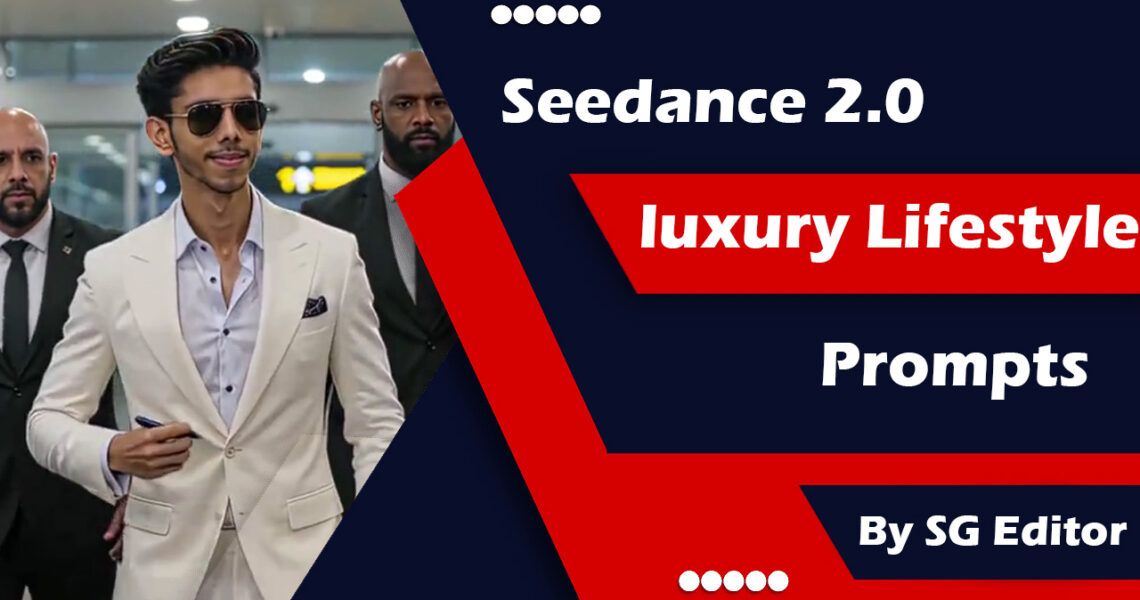
Seedance 2.0 Luxury Lifestyle Prompts
By SG Editor
The prompts that actually deliver — and the ones that burned my time
By a real user who spent way too many credits figuring this out◆May 2026◆15 min read SEEDANCE 2.0 · LUXURY LIFESTYLE SERIES
Cinematic AI video generation — Seedance 2.0 with SG Editor’s luxury lifestyle prompt library
Let me be honest with you. When I first loaded up Seedance 2.0 and tried to generate anything that looked remotely “luxury” — a penthouse at golden hour, a model stepping off a private jet, a slow-motion pour of Scotch into a crystal glass — the results were, to put it gently, disappointing. Flat lighting. Weird hands. Movement that looked like someone had filmed a mannequin during a mild earthquake.
I spent probably three hours and a not-insignificant number of generation credits that first week just producing videos that looked like stock footage from 2014. And I kept seeing other creators posting these absolutely stunning Seedance clips — cinematic depth, silky camera movement, real atmospheric weight. I couldn’t figure out what I was missing.
Then I came across the SG Editor luxury lifestyle prompt collection, and genuinely — it changed how I was using the tool entirely. Not because it’s magic, but because whoever put that set together actually understands how Seedance 2.0 “thinks” about language. The prompts are structured differently from what I was writing intuitively. And once I started understanding the logic behind them, I stopped wasting credits on mediocre outputs.
So this is my attempt to break that down for you — what these prompts are, why they work, how to adapt them, and where I still see people getting stuck (including mistakes I made myself).
✦ ✦ ✦
What Is the SG Editor Luxury Lifestyle Prompt Library?
If you haven’t encountered SG Editor’s work yet, they’re one of the more technically precise AI video creators putting out systematic prompt resources. The luxury lifestyle series specifically is a curated set of prompts engineered for Seedance 2.0 that targets high-end visual aesthetics — think fashion editorial, luxury travel, upscale lifestyle content, branded product cinematography.
What makes it different from random prompt lists floating around on Reddit or YouTube? The structure. SG Editor’s prompts follow a consistent architecture that layers multiple elements: the visual atmosphere, the motion language, the light source, and the subject behavior — all in a specific sequence that Seedance 2.0 responds to more reliably.
It’s not just about pretty words. It’s prompt engineering with a clear mental model of how the model interprets input.
The Anatomy of a Good Seedance Luxury Prompt
Before I share some of the actual prompt examples (and how I’ve adapted them), let me explain the structure I’ve observed. Every strong luxury lifestyle prompt in this library tends to hit five layers:
The Five-Layer Structure
- Scene anchor — Where are we? What kind of space? (Maldives overwater villa, Parisian penthouse, Monaco marina)
- Light condition — Golden hour, blue hour, candlelight, overcast diffused — Seedance is very responsive to this.
- Camera behavior — Slow dolly, rack focus, aerial drift, push-in. This is where most beginners underspecify.
- Subject descriptor — If there’s a person, how are they behaving? Not “a woman standing” but the quality of movement, mood, direction of gaze.
- Texture/material call-out — Linen, raw silk, polished marble, aged leather. Seedance 2.0 handles material rendering surprisingly well when you name it explicitly.
Most of the prompts I was writing before had maybe two of these. The SG Editor prompts consistently have all five, and the ordering matters — atmosphere first, then camera, then subject. It mirrors how a cinematographer would actually brief a shot.
Real Prompt Examples — What They Look Like
Here are several prompts from the luxury lifestyle series, as I’ve been using and adapting them. I’ve noted what works particularly well in each case and what to watch for.
Prompt 01
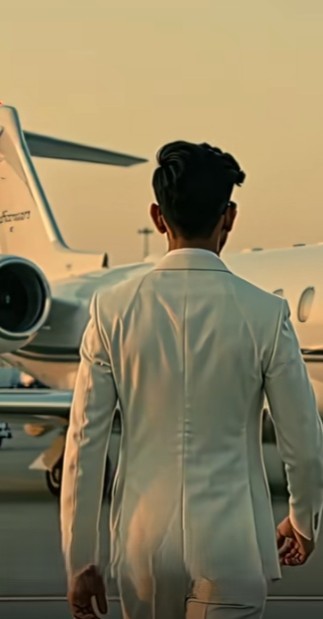
Seedance 2.0 Master Prompt — Celebrity Airport Scene
Character Reference Description (from your images):
Young South Asian male, sharp facial features, well-groomed dark hair styled in a sleek pompadour/quiff, light stubble beard, confident and calm expression. Do not alter face. Lock character identity throughout all shots.
FULL VIDEO PROMPT:
“A cinematic, ultra-realistic celebrity arrival sequence shot on ARRI Alexa with anamorphic lenses, real shallow depth of field bokeh, professional Hollywood-grade color grading.
A young South Asian male celebrity — sharp jawline, sleek dark pompadour hair, light beard stubble, dressed in an immaculate white three-piece suit with a perfectly fitted waistcoat, crisp white dress shirt, and tailored white trousers — walks out of the VIP exit gate of a major international airport.
Two tall, broad-shouldered bodyguards in black suits flank him on both sides. A massive energetic crowd is lined up behind steel barricades on both sides, hundreds of fans screaming, waving, and holding up phones recording. The crowd is loudly chanting ‘SG Editor! SG Editor! SG Editor!’ repeatedly with excitement and energy. Camera flashes explode from every direction like a lightning storm.
The celebrity walks in slow motion, relaxed and confident, slight smirk on his face, sunglasses resting on his nose, one hand casually adjusting his white suit jacket. Background crowd is in beautiful cinematic bokeh blur — soft, organic, film-like out-of-focus lights and faces swirling behind him.
Cut to: A young fan breaks through slightly, reaching out nervously with a pen and paper, asking for an autograph. The celebrity pauses, smiles warmly at the camera, takes the pen, and signs the paper in a smooth, cool gesture while bodyguards gently manage the crowd.
Cut to: Outside the airport entrance. A matte black BMW 7 Series luxury sedan is parked, door already open. The celebrity walks toward it in full stride — suit jacket flowing slightly — crowd still visible and screaming in the background, soft bokeh city lights glowing.
Final shot: The celebrity slides into the plush leather back seat of the BMW, door closes, and the window rolls up slowly showing a faint reflection of the screaming crowd. Camera slowly pulls back with a cinematic rack focus as the BMW smoothly drives away.
Visual style: 4K cinematic, warm golden-hour and cool indoor mixed lighting, anamorphic lens flares, real film grain, shallow DOF bokeh throughout, slow-motion crowd moments at 120fps, smooth gimbal movement, professional movie color grade — deep blacks, rich skin tones, elegant highlights on white suit.”
Prompt 02
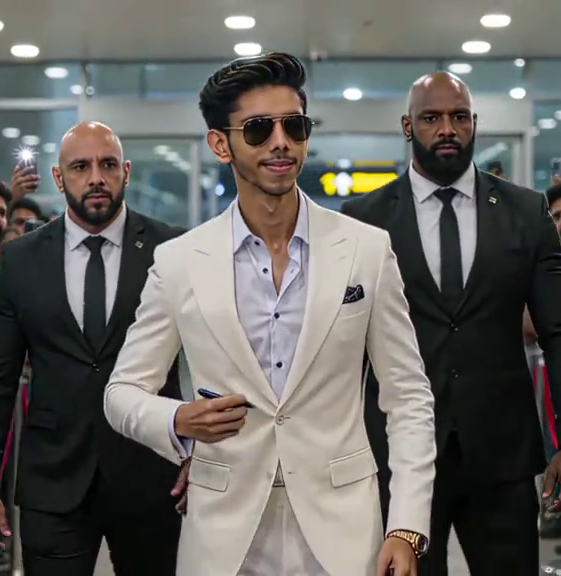
Young South Asian male, sharp jawline, styled swept-back dark hair with subtle teal highlight, thin mustache & beard, confident yet intense expression — dressed in a white three-piece suit with trendy silver/black aviator sunglasses.
🎥 ANGLE 1 — FRONT CLOSE-UP
A cinematic close-up shot of a stylish young South Asian man with swept-back dark hair, sharp jawline, thin beard, and aviator sunglasses, wearing a crisp white three-piece suit. He walks confidently toward the camera on a private airport tarmac. Teal and golden hour light plays across his face. His expression is cold, powerful, and unbothered. Slow-motion movement. Bokeh background. Shot on ARRI Alexa. Cinematic color grade. 4K ultra-realistic.
🎥 ANGLE 2 — BEHIND / BACK SHOT FOCUSED ON PRIVATE JET
A dramatic cinematic tracking shot from behind a sharply dressed young South Asian man in a white three-piece suit and aviator sunglasses, walking across a private airport runway. In the background, a sleek white Gulfstream G700 private jet dominates the frame with its stairs extended, engines glowing. The camera follows slowly at waist level. Wind subtly moves his suit jacket. Ultra-wide lens. Golden dusk lighting. Cinematic grade. 4K.
🎥 ANGLE 3 — FULL BODY SIDE / WIDE SHOT
A wide cinematic full-body shot of a confident young South Asian man in a perfectly tailored white three-piece suit and trendy black aviator sunglasses, striding across the tarmac of a luxury private airport. A gleaming white private jet sits majestically in the background with ground crew around it. The camera slowly dollies alongside him at a 45-degree angle. Dramatic orchestral energy. Sunset lighting with lens flares. Shot on RED camera. 4K cinematic.
Prompt 3
How To Generate Just Add your Clear Face Image on Seedance 2.0
There are Lot of Websites which Provide Seedance 2.0 Where You Got Cheap Use it.
Steps
- Upload Reference Face Image
- Add Your Detailed Prompt
- Resolution 720p
- Tap On Generate.
- Done
Here are 15 platforms/tools where creators are currently accessing or using Seedance 2.0:
- Higgsfield — Most popular cinematic workflow platform.
- Dreamina — Official international ByteDance platform.
- CapCut Video Studio — Integrated Seedance workflow inside CapCut ecosystem.
- HeyGen — Seedance with avatars, voice cloning, and lip sync.
- Pippit AI — ByteDance marketing video platform using Seedance.
- BytePlus ModelArk — API/developer access for Seedance.
- Jimeng AI (Jianying) — Chinese official Seedance platform.
- Videonoiz — Community-reported Seedance workflow support.
- Pollo AI — Aggregator platform offering Seedance access in some regions.
- OpenArt — Supports Seedance generation workflows.
- FlexClip — Limited Seedance-based video generation.
- Lovart AI — Supports Seedance with reference assets.
- Topview AI — Storyboard + timeline workflow using Seedance.
- PiAPI AI — Third-party Seedance API provider.
- Loova AI — Community-mentioned alternative access provider.
The Camera Language That Changes Everything
This is where I personally made the biggest mistakes early on. I kept writing things like “camera slowly moves” — which is vague enough that Seedance 2.0 can interpret it in five different ways, and usually picks the most boring one.
SG Editor’s prompts use specific cinematography vocabulary: dolly in, lateral drift, aerial glide, rack focus, push-in, handheld breathe. These aren’t decorative — Seedance 2.0 has been trained on enough film reference material that these terms produce meaningfully different motion behaviors.
“The difference between ‘camera moves toward subject’ and ‘slow cinematic push-in with slight organic drift’ isn’t just stylistic — it’s the difference between a video that looks generated and one that looks directed.”
Try it yourself: take any prompt you’ve written, and replace your motion description with one of these specific cinematography terms. Almost always, the output is noticeably more composed.
Light Is the Actual Secret
If I had to pick one thing from the SG Editor approach that matters most for luxury output, it’s the precision of light description. Luxury aesthetic in photography and film is almost entirely a function of light quality — that’s true in the real world and it carries directly into Seedance 2.0 prompts.
General terms like “good lighting” or “bright” produce mediocre results. But when you specify:
Light Descriptors That Actually Work
- Golden hour / magic hour — warm directional light, long shadows, immediate cinematic quality
- Blue hour — post-sunset ambient, cool tones, works beautifully for urban luxury scenes
- Overcast diffused — soft shadowless light, ideal for fashion/editorial skin tones
- Single-source candlelight — intimate, warm falloff, best for interior dining scenes
- Rim-lit / backlit — great for product shots, creates immediate premium feel
- Morning window light — raking light across textured surfaces (bedsheets, marble, wood grain)
Don’t just name the time of day — name the quality of the light and what it’s hitting. “Golden hour sunlight raking across polished Italian marble” gives Seedance 2.0 three rendering cues in a single phrase.
Step-by-Step: How to Adapt These Prompts for Your Niche
The SG Editor prompts work as written, but they really shine when you adapt them to your specific content niche. Here’s how I do it:
The Adaptation Process
- Start with the closest base prompt. Pick the SG prompt that most resembles your intended output — even if the setting or subject is different.
- Keep the camera and light layers intact. These are the load-bearing elements. Don’t change the motion type or light descriptor in your first iteration.
- Swap only the scene anchor and subject. Replace “Mediterranean cliffside villa” with “Tokyo high-rise” or “desert resort in Morocco.” Replace the subject descriptor while preserving the behavioral quality.
- Add one brand-specific material. If you’re creating content for a specific aesthetic — say, Japandi minimalism — add one material call-out that anchors it: “bleached oak,” “natural linen,” “wabi-sabi ceramics.”
- Generate, evaluate, iterate on light first. If the output isn’t right, the light description is usually where to adjust before anything else.
Common Mistakes I Kept Making (And Probably You Are Too)
Let me save you some credits here.
What I Was Doing
Writing prompts like a Google search query — “luxury villa sunset beautiful woman cinematic”
What Actually Works
Writing prompts like a director’s shot note — layered, atmospheric, with camera + light + subject in sequence
Overloading the Subject
Describing the person in enormous detail — hair, outfit, expression, age, ethnicity — before establishing scene and light
Lead With Atmosphere
Scene anchor → light quality → camera movement → subject (kept minimal). The model fills in subject details more naturally this way
Ignoring Motion Specificity
“The camera moves slowly toward the subject” — Seedance interprets this as a zoom, which looks cheap
Name the Move
“Slow cinematic push-in with slight lateral drift” — now Seedance 2.0 produces actual camera movement, not a digital zoom
Expecting Perfect First Generations
Using first-gen outputs without iterating. Even strong prompts produce 1–2 weak generations in every batch of 4.
✓ Always Generate in Batches
Generate 4 at a time minimum. Pick the best, use it as a reference for your next iteration. The SG prompts improve with iteration.
The Aspect Ratio and Duration Thing Nobody Talks About
One small thing that’s made a real difference in my luxury lifestyle outputs: Seedance 2.0 handles horizontal widescreen at shorter durations far better than vertical or square at longer ones, for this type of content specifically.
Most of the SG Editor luxury prompts are implicitly designed for 16:9 or 2.35:1 output. If you’re pushing them into vertical (9:16) for Instagram Reels or TikTok, the composition logic changes and you’ll often get awkward cropping behavior around the key cinematic elements — particularly for the aerial and wide-establishing shots.
My workaround: generate horizontal first, then use a separate tool (I use CapCut or DaVinci for this) to reframe for vertical. It’s an extra step but the quality difference is significant.
When Seedance 2.0 Struggles — And What to Do
Even with strong prompts, there are certain scenarios where Seedance 2.0 consistently underperforms for luxury content:
Hands and fine detail interactions. Any prompt involving someone handling an object — pouring wine, turning pages of a book, fastening jewelry — tends to produce artifacts around hand and finger rendering. The SG Editor collection cleverly sidesteps this by keeping close-up hand interactions as extreme macro product shots without a visible actor. The crystal tumbler prompt (Prompt 03 above) is a good example — notice there’s no hand in frame.
Text on surfaces. Don’t try to render logos, labels, or text on products. It will look wrong every time. Either prompt for unlabeled/generic versions of luxury goods, or replace specific brands with material descriptors.
Multiple speaking or clearly interactive subjects. Seedance 2.0 handles single subjects in luxury settings much more cleanly than group social dynamics. The superyacht prompt keeps background figures deliberately vague and out-of-focus for this reason.
My Honest Take After Months of Using This
I’ve been using Seedance 2.0 seriously for several months now, and the SG Editor luxury lifestyle prompts remain my starting point for anything high-end. Not because I use them verbatim — at this point I’ve internalized the structure enough that I’m building my own variations — but because the underlying logic is sound and it matches how Seedance 2.0 actually processes spatial, atmospheric, and motion language.
If you’re a content creator working in travel, fashion, hospitality, real estate, or any luxury adjacent space, the investment of time to understand these prompts properly is worth it. You’ll stop burning credits on mediocre outputs and start building a library of reference clips you can actually use in client work or brand content.
One thing I’d say: don’t treat this as a cheat sheet to copy-paste blindly. The creators who are producing genuinely outstanding Seedance content right now are the ones who understand why these prompts work — which means they can adapt when a specific scene or brief requires something the template doesn’t cover.
“The best prompt engineers aren’t the ones with the longest prompt libraries. They’re the ones who understand the model’s native logic well enough to improvise.”
Start with the SG Editor structure. Understand what each layer is doing. Then start breaking the rules intentionally — that’s where the genuinely interesting outputs live.
✦ ✦ ✦
Quick Reference — SG Editor Prompt Formula
The Template
- [Camera move] + [scene anchor] + [time of day/light quality]
- [Light hitting what surface/material]
- [Subject descriptor — minimal, behavioral, not physical]
- [Lens/aesthetic reference] + [color palette/grade description]
- [One mood/tone word] to close
Example: “Slow cinematic push-in on a Maldives overwater villa at blue hour, warm interior light spilling onto polished teak, a figure in white linen visible through open glass doors, shot with a Leica aesthetic, color grade in warm ivory and deep sea tones, quiet opulence.”
Seedance 2.0AI VideoPrompt EngineeringLuxury ContentSG EditorCinematographyAI Filmmaking
Written from real-world usage experience. No sponsored content. No affiliate links.