
Photo enhancement using Gemini AI is currently trending on TikTok and Instagram. Many people are searching for AI photo enhancement prompts to improve image quality quickly and easily. In this article, you’ll find ready-to-use Gemini AI prompts that help enhance photo quality with just one click.
You simply upload your photo, enter the prompt, and Gemini AI improves the image instantly. There’s no need to install extra photo editing apps—Gemini AI can enhance your photos online with ease.
How to Enhance Photo Quality Using Gemini AI
Enhancing photo quality with Gemini AI depends on how well you write your prompt. Below is a simple, clear, and SEO-friendly step-by-step guide with effective prompts.
Step-by-Step Method
Step 1: Open Gemini AI
Open Gemini AI on the web or app and select the image generation or image editing option.
Step 2: Upload Your Photo
Upload the low-quality, blurry, or pixelated image you want to enhance.
Step 3: Write a Clear Enhancement Prompt
Use clear and specific words such as high resolution, sharp focus, natural skin texture, and balanced lighting.
Step 4: Generate and Download
Let Gemini AI process the image, then download the enhanced version.
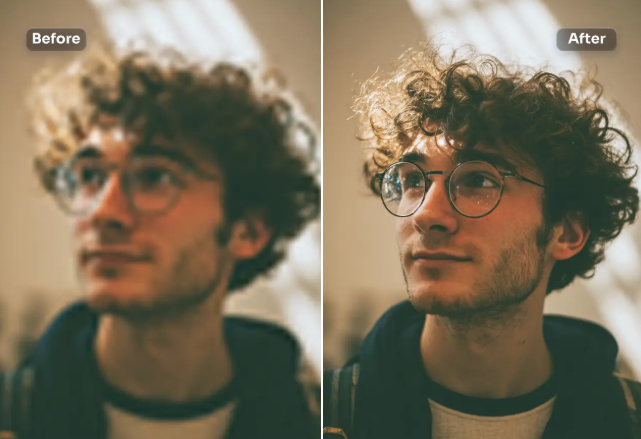
Prompt
Enhance the existing photo only - keep the original framing, angle, composition, and facial proportions exactly the same. Do not crop, zoom, or convert to a close-up. Improve overall image clarity and sharpness naturally, with special attention to eye detail while keeping the full face and original framing intact. Refine focus slightly for better definition without making it overly sharp.
Apply soft, natural cinematic lighting correction, preserving realistic shadows and depth already present in the image.
Enhance natural skin texture with visible pores and fine details - no beauty smoothing, no skin softening.
Remove digital noise and compression artifacts while retaining organic texture.
Improve dynamic range and contrast subtly, with muted highlights and rich mid-tones.
Maintain accurate, organic skin tones with realistic color balance.Add very subtle cinematic film grain for a professional movie-still look. Background should remain exactly as it is, only slightly cleaner if noisy - no artificial blur added. Preserve all facial features, expressions, hair strands, and natural imperfections.
Photorealistic result, professional camera look, high-quality
enhancement only - no stylization.
NEGATIVE PROMPT (CRITICAL close-up, zoomed-in, cropped face, changed framing, face alteration, reshaped features, beauty filter, oversmoothed skin, plastic skin, waxy texture, Al face, cartoon, anime, CGI, illustration, painting, artificial blur, fake bokeh, harsh lighting, flat lighting, over-sharpening, halos, HDR look, distorted eyes, asymmetry, extra details, digital artifacts, smartphone filter look.
30: RECOMMENDED SETTINGS (IMPORTANT)
Image-to-mage Strength /
Denoise: 0.15 0.30
CFG / Guidance: 5-7
Steps: 25 - 35
Face Restoration: OFF
Upscale: After final result only (2x max)
Seed: Fixed (for consistency)Best Gemini AI Prompts for Photo Enhancement
General Photo Enhancement Prompt
Enhance this photo to high resolution, improve sharpness and clarity, reduce noise, restore natural colors, balanced lighting, realistic details, and professional photo quality.
Face / Portrait Enhancement Prompt
Enhance this portrait photo, improve facial details, sharp eyes, natural skin texture, soft lighting, realistic skin tones, no over-smoothing, DSLR-quality output.
Old or Blurry Photo Enhancement Prompt
Restore and enhance this old blurry photo, increase resolution, fix blur, reduce noise, recover details, maintain the original look, realistic and natural result.
Social Media Ready Prompt
Enhance this photo in high quality with vibrant but natural colors, sharp details, cinematic lighting, optimized for Instagram and TikTok.
Product or Object Photo Prompt
Enhance this product photo with high sharpness, a clean background, accurate colors, professional studio lighting, and ultra-clear details.
Tips for Better Results
- Use words like realistic, natural, and DSLR-quality
- Avoid cartoon or painting styles unless needed
- Add phrases like “no plastic skin” or “no artificial effects” for natural results
Final Tip
Gemini AI delivers the best results when prompts are clear, detailed, and focused on realism. Even small changes in your prompt can greatly improve photo quality.
Conclusion
AI photo enhancement prompts are trending on TikTok and Instagram, and many users are searching for easy ways to improve photo quality. In this article, we shared effective Gemini AI photo enhancement prompts that help you enhance images with just one click.
Mix2VFX, a website by Hamza VFX, provides trending AI prompts, photo and video editing apps, CapCut templates, and much more.